Share And Convert Files Confidentially
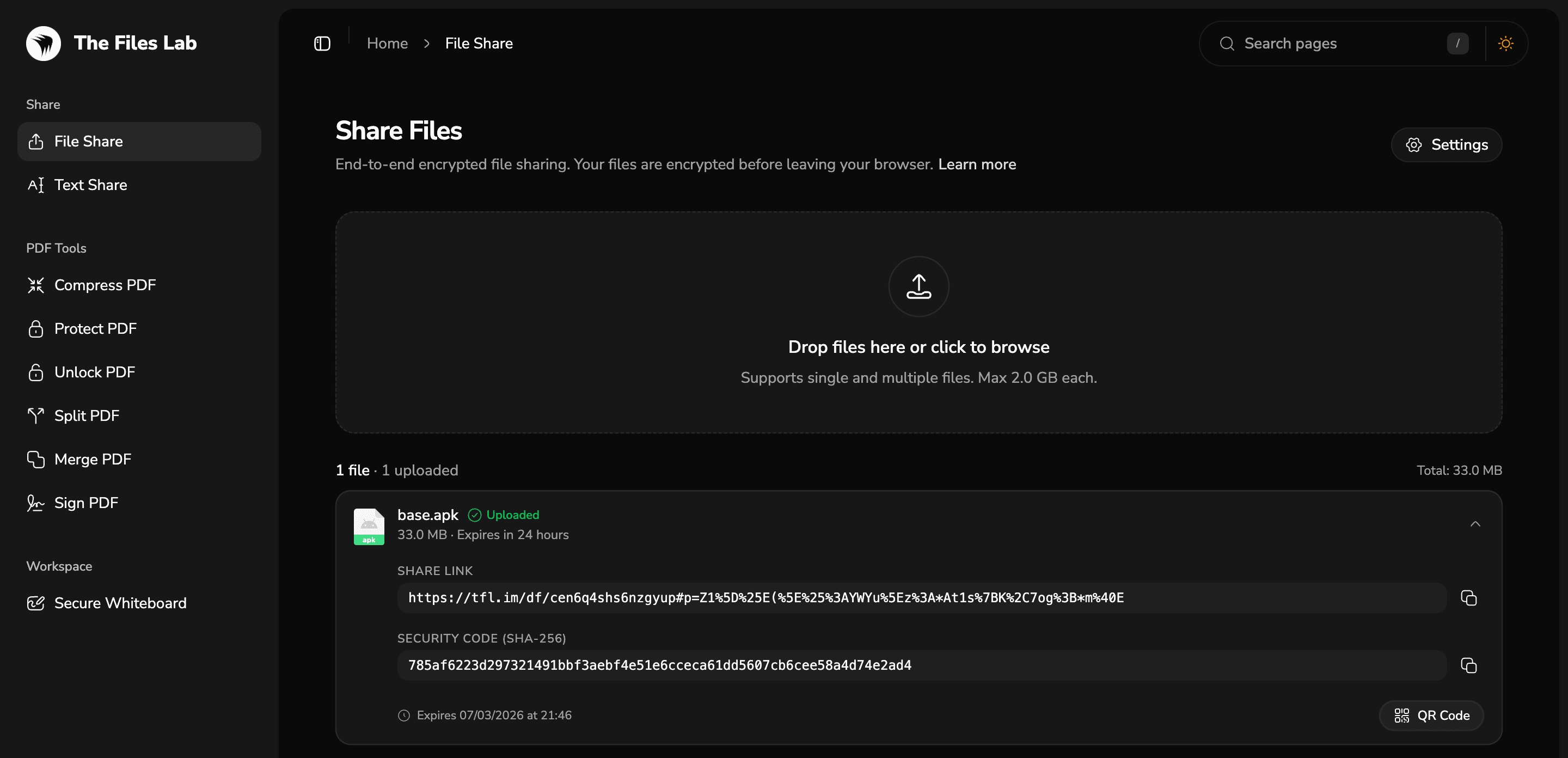
Share securely. Files vanish automatically. Your data never touches our servers—just end-to-end encryption and zero-knowledge privacy.
Built for private file workflows
The Files Lab combines encrypted sharing, client-side document tools, and local-first collaboration in one browser-first workspace.
Encrypted sharing
Share files and text with in-browser XChaCha20-Poly1305 encryption and scrypt-derived keys before any upload begins.
Client-side PDF tools
Compress, merge, split, protect, unlock, and sign PDFs in your browser without sending document contents to a server.
Local-first whiteboards
Boards stay in browser storage by default, while shared snapshots use encrypted payloads when you need to send them out.
Controlled access
Choose expiry and region settings, protect shares with passwords or embedded keys, and keep decryption workflows in-browser.
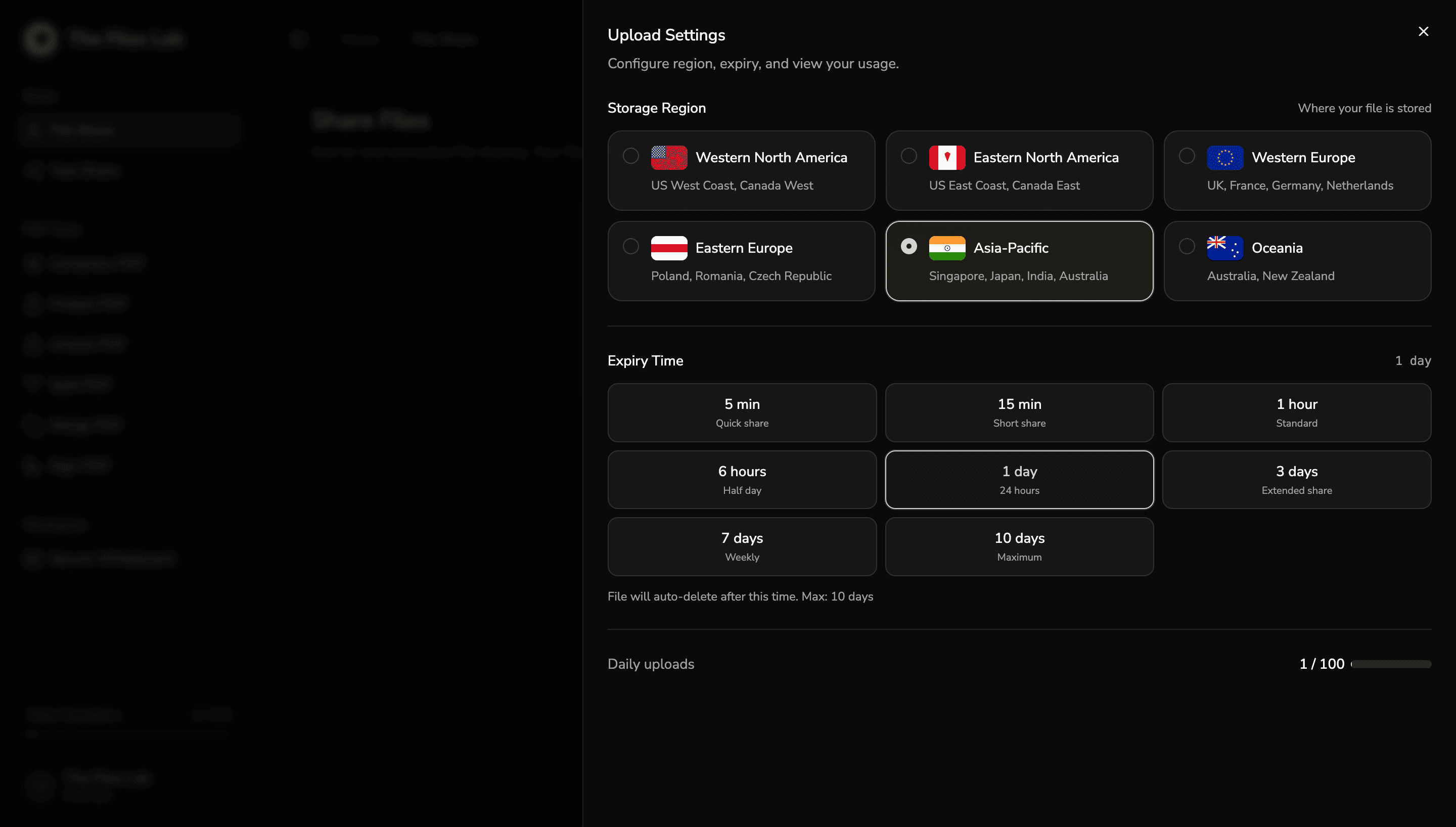
Choose where your shares live and when they expire.
File Share, Text Share, and encrypted whiteboard snapshots all use the same shared settings surface. Storage region is selectable before upload, so you can keep payloads in the location that fits your workflow.
Expiry presets are plan-aware from the start. Free shares can be set as short as 1 minute and up to 1 day, while Pro extends that window up to 10 days for longer-running access.
Region-aware storage
Pick from North America, Europe, APAC, and Oceania regions directly in share settings.
Time-based expiry
Use preset expiry windows so links auto-delete on schedule and stay within plan limits.
Private tools for sharing, document work, and secure collaboration.
The Files Lab brings encrypted sharing, in-browser PDF workflows, secure whiteboards, and usage-aware controls into one browser-first platform.
Secure Sharing Control Center
Manage encrypted uploads, region selection, expiry settings, and recipient-ready links from a single flow.
Client-Side PDF Workspace
Compress, merge, split, protect, unlock, and sign documents directly in your browser.
Private Collaboration
Share encrypted whiteboard snapshots, deliver secure handoffs, and keep follow-up context private.
@Product Team shared a secure whiteboard snapshot
Dashboards & Usage
Track daily operations, upload capacity, and share windows with clear plan-aware usage cues.
Cloudflare-backed reach for secure sharing.
Encrypted uploads, share links, and browser-first workflows stay close to recipients worldwide while region controls still let you choose where share payloads live.
Network cities cities on Cloudflare’s network help encrypted uploads and share links stay close to recipients worldwide.
Countries covered countries are covered globally, while R2 region selection still lets you choose where share payloads are stored.
Edge capacity of published edge capacity backs the network delivering your secure shares, downloads, and browser-first workflows.

Start secure work with The Files Lab
Encrypt file shares, run PDF workflows in your browser, and keep private whiteboard collaboration under your control from the first upload.
Start SharingView Pricing